Ever wondered how large engineering teams keep track of what was deployed, when it was deployed, and what exactly changed? In production environments, a missed deployment record or an untracked metadata change can lead to hours of debugging and costly rollbacks.
AuditTrail is a comprehensive full-stack application I built to solve exactly this problem — a deployment tracking, audit management, and change visualization platform that can batch process 40,000+ metadata records with real-time dashboard analytics.
Why This Project?
In real-world software teams, deployments happen frequently — sometimes multiple times a day. Without a centralized system to track these changes, teams face:
- Accountability gaps — Who deployed what and when?
- Debugging nightmares — Which component changed and broke production?
- Compliance risks — No audit trail for regulatory requirements.
- Metadata overload — Thousands of component changes with no way to visualize them.
AuditTrail was designed to address all of these pain points by providing a centralized, role-based platform where every deployment and every metadata change is tracked, visualized, and auditable.
System Architecture
The system follows a clean three-tier architecture with complete separation between the frontend, backend, and database layers. Docker Compose orchestrates all three services seamlessly.
React Frontend (Port 3000)
        │
        ▼
Spring Boot Backend (Port 8081)
        │
        ▼
PostgreSQL Database (Port 5432)
Architecture Highlights
- Monolithic but modular backend — cleanly separated into controllers, services, repositories, and security layers.
- RESTful API design with comprehensive Swagger/OpenAPI documentation.
- Stateless JWT authentication — no server-side session storage.
- Docker Compose for one-command infrastructure spin-up.
- Spring Batch for high-performance CSV ingestion.
Key Features
1. Authentication & Role-Based Access Control
Security is handled via Spring Security 6.2 with JWT (JJWT 0.12.3) for stateless, token-based authentication. The system enforces three distinct roles:
| Role | Permissions |
|---|---|
| ADMIN | Full access — create, read, update, delete everything |
| DEVELOPER | Create deployments, upload metadata, view dashboards |
| VIEWER | Read-only access to dashboards and reports |
Method-level security is enforced using @PreAuthorize, ensuring privilege escalation is impossible even if the API is accessed directly.
2. Dashboard Analytics
The React frontend features a rich, multi-tab dashboard powered by Recharts 2.x:
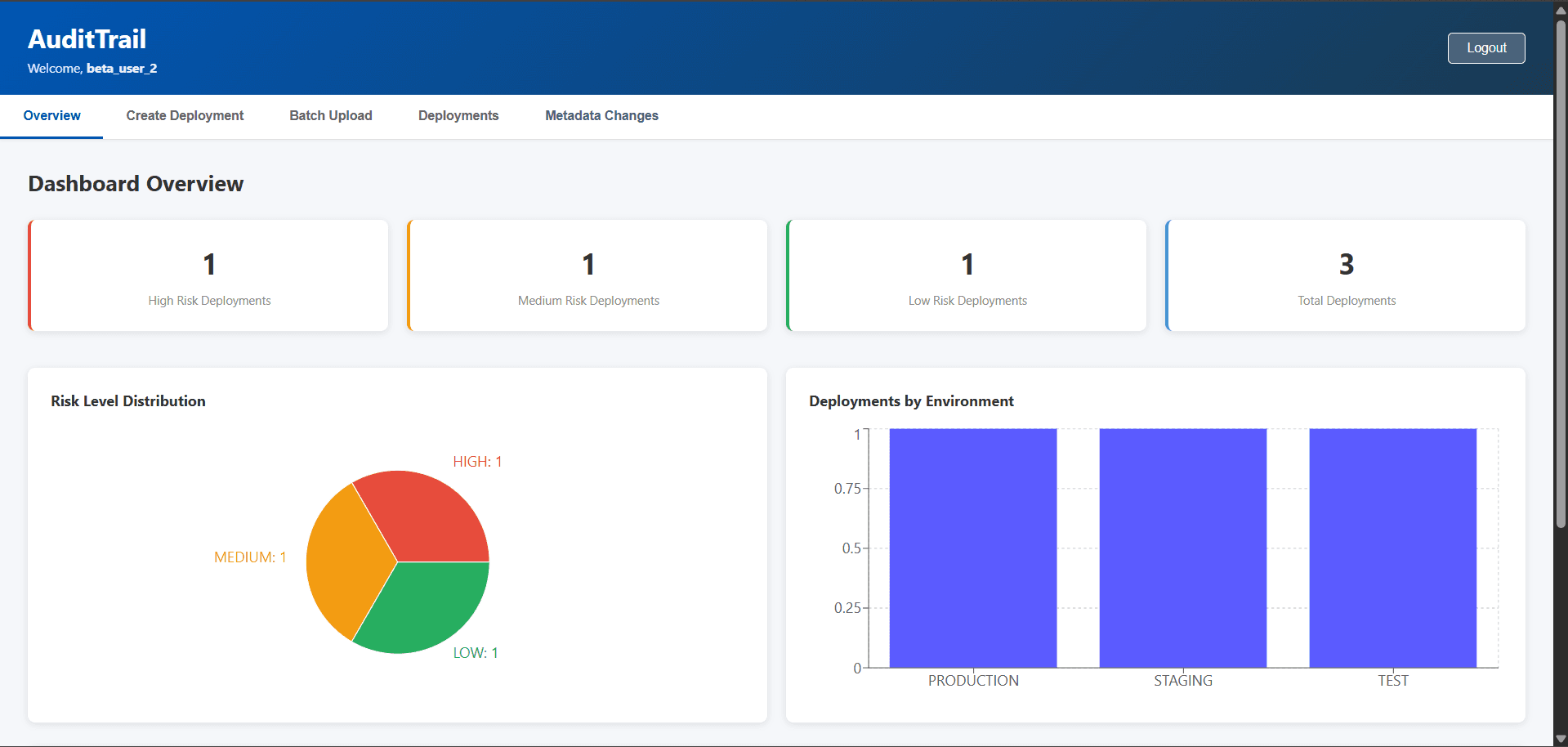
- Overview Tab — Risk level distribution (pie chart) and environment breakdown (bar chart).
- Deployments Tab — Full CRUD operations for deployment records.
- Metadata Changes Tab — Visualize all tracked changes with treemap and horizontal bar charts.
- Batch Upload Tab — Upload CSV files and process metadata in bulk with real-time progress.
3. Risk Assessment Engine
Every deployment is automatically assigned a risk level based on its target environment:
- PRODUCTION → HIGH risk
- STAGING → MEDIUM risk
- TEST / DEV → LOW risk
This enables teams to prioritize review and approval workflows for high-risk deployments before they hit production.
4. Batch CSV Processing (40K+ Records)
This is one of the most powerful features of the platform. Using Spring Batch, you can upload a single CSV file containing 40,000+ metadata records and have them processed efficiently:
- Chunk-based processing — 500 records per database transaction.
- Automatic enum conversion —
REMOVED→DELETED,UPDATED→MODIFIED. - Graceful error handling with skip logic — bad rows don't crash the entire batch.
- Performance metrics — throughput, timing, and success rate reported after every upload.
5. Data Visualization
The dashboard transforms raw deployment data into actionable insights:
- Risk Distribution — Pie chart showing HIGH/MEDIUM/LOW deployment breakdown.
- Environment Distribution — Bar chart of deployments per environment.
- Metadata Changes — Horizontal bar chart categorizing change types (CREATED, MODIFIED, DELETED).
- Top Contributors — Bar chart ranking users by their change count.
Tech Stack
Backend
- Java 21 & Spring Boot 3.2.3
- Spring Data JPA with Hibernate 6.4.4
- Spring Security 6.2.2 with JWT (JJWT 0.12.3)
- Spring Batch for bulk CSV processing
- Springdoc OpenAPI 2.2.0 for Swagger documentation
- Lombok for boilerplate reduction
- Apache Commons CSV for file parsing
- JaCoCo for test coverage reporting
Frontend
- React 18 with React Router
- Axios for HTTP communication
- Recharts 2.x for data visualization and charting
- CSS Grid / Flexbox for responsive layouts
Infrastructure
- PostgreSQL 18 — Relational database
- Docker & Docker Compose — Full containerization
- GitHub Actions — CI/CD pipeline
Database Schema
The system uses five core tables with well-defined foreign key relationships:
| Table | Purpose |
|---|---|
| users | Stores user credentials, roles (ADMIN/DEVELOPER/VIEWER), and creation timestamps |
| deployments | Tracks deployment name, environment, risk level, deployer, and notes |
| metadata_changes | Records every component change — type, old/new value, who changed it, and when |
| releases | Groups deployments into versioned releases with status tracking |
| release_deployments | Join table linking releases to their constituent deployments |
API Endpoints
The backend exposes a comprehensive REST API organized into five modules:
Auth Module (/api/auth)
POST   /register            Register new user
POST   /login               Login and get JWT token
Deployments Module (/api/deployments)
POST   /                    Create deployment
GET    /                    Get all deployments (paginated)
GET    /{id}               Get deployment by ID
DELETE /{id}               Delete deployment (ADMIN only)
Metadata Changes Module (/api/metadata)
GET    /                    Get all metadata changes (paginated)
GET    /by-deployment/{id}  Get changes for specific deployment
GET    /by-component/{name} Get history of specific component
DELETE /all                 Delete all metadata (ADMIN only)
Batch Module (/api/batch)
POST /upload-metadata-csv Upload and process CSV file
Releases Module (/api/releases)
POST   /                    Create release
GET    /                    Get all releases
GET    /{id}               Get release by ID
DELETE /{id}               Delete release
All endpoints are fully documented and testable via Swagger UI at http://localhost:8081/audittrail/swagger-ui.html.
Testing
AuditTrail includes comprehensive test coverage with 71 unit and integration tests achieving approximately 90% code coverage.
| Module | Tests | Coverage |
|---|---|---|
| Services | 30 | ~90% |
| Security | 15 | ~85% |
| Integration | 6 | ~95% |
| Repositories | 20 | ~100% |
| Total | 71 | ~90% |
The test suite covers service layer logic, role-based authorization enforcement, batch processing edge cases, and full end-to-end integration workflows.
Key Design Decisions
- Why a monolithic architecture? For a single-team deployment tracking tool, microservices would introduce unnecessary complexity. A well-structured monolith with clean layer separation provides all the modularity needed while keeping operational overhead minimal.
- Why PostgreSQL? Deployment records, metadata changes, and audit trails are inherently relational. Foreign key constraints and transactional guarantees are critical for data integrity.
- Why Spring Batch for CSV processing? Processing 40K+ records in a single request demands chunk-based, transactional processing with retry and skip logic — exactly what Spring Batch is designed for.
- Why JWT over session-based auth? Stateless authentication scales naturally and simplifies the Docker deployment — no sticky sessions or shared session stores required.
Challenges Faced
- Batch Processing at Scale — Processing 40,000+ CSV records required careful chunk sizing (500 per transaction) and error handling to prevent memory issues and partial failures.
- Role-Based Security Granularity — Implementing method-level
@PreAuthorizechecks across all endpoints while keeping the security configuration maintainable was a significant effort. - Enum Normalization — Real-world CSV data is messy. Building automatic conversion from
REMOVED→DELETEDandUPDATED→MODIFIEDwith graceful skip logic for truly invalid values required defensive coding. - Docker Networking — Configuring service-to-service communication within Docker Compose (backend connecting to
postgres:5432instead oflocalhost:5432) required understanding Docker's internal DNS resolution. - Frontend State Management — Managing authentication state, paginated API responses, and real-time chart updates across multiple dashboard tabs demanded careful component architecture.
What I Learned
Through this project, I gained deep hands-on experience in:
- Building production-grade REST APIs with Spring Boot 3 and proper layered architecture.
- Implementing stateless JWT authentication with role-based access control at the method level.
- Designing and executing high-performance batch processing pipelines with Spring Batch.
- Creating interactive data visualizations with Recharts in React.
- Containerizing a full-stack application with Docker Compose — database, backend, and frontend all orchestrated together.
- Writing comprehensive unit and integration tests with JUnit 5 and Mockito, achieving 90% coverage.
Most importantly, I learned how to think about enterprise-grade concerns — security, scalability, auditability, and operational simplicity — from the very beginning of the design process.
Setup & Execution
Quick Start with Docker (Recommended)
The fastest way to run AuditTrail is using Docker Compose, which spins up PostgreSQL, the Spring Boot backend, and the React frontend in one command:
git clone https://github.com/UmashankarGouda/AuditTrail.git
cd AuditTrail

docker-compose up
Wait 30-40 seconds for all services to initialize, then open:
- Frontend:
http://localhost:3000 - Backend API:
http://localhost:8081/audittrail/api - Swagger UI:
http://localhost:8081/audittrail/swagger-ui.html
Default Login Credentials:
Username: admin_user
Password: AdminPass123!
Role:     ADMIN
Manual Setup (Without Docker)
Prerequisites:
- Java 21+
- PostgreSQL 18+
- Node.js 18+ & npm
- Maven 3.9+
1. Database Setup
CREATE DATABASE audittrail_db;
CREATE USER audittrail_user WITH PASSWORD 'AuditTrail123!';
GRANT ALL PRIVILEGES ON DATABASE audittrail_db TO audittrail_user;
2. Start Backend
mvn clean install
mvn spring-boot:run
Backend starts on http://localhost:8081/audittrail
3. Start Frontend
cd frontend
npm install
npm start
Frontend starts on http://localhost:3000
Future Enhancements
| Planned Improvements |
|---|
| Elasticsearch integration for metadata search |
| Kafka for real-time event streaming |
| GraphQL API alongside REST |
| Multi-region deployment support |
| Advanced audit logging with diff visualization |
| Deployment rollback automation |
Conclusion
AuditTrail demonstrates how a well-architected full-stack application can solve real enterprise problems — deployment tracking, audit management, and change visualization — with a clean, scalable, and secure design.
It highlights the importance of:
- Clean layered architecture with strict separation of concerns
- Enterprise-grade security with JWT and role-based access control
- High-performance batch processing for real-world data volumes
- Rich data visualization for actionable insights
- Docker-first deployment for operational simplicity
If you found this helpful, star the repo on GitHub!